In this tutorial, we'll go through the process of creating a custom entity type. We could use the built-in Content Type to create our data structure but we'll then have the extra overheads of the title, body, revisions and comments which we may not want or need to use and the content would also be visible in the "Content" section of the admin interface.
In a later tutorial, we'll make our content type fieldable so that others can add extra fields to our data structure. We'll also expose our fields to the Views module.
More info links: -
I want to convert a program I created in Visual Foxpro 9 a few years ago and thought it would be an ideal candidate for creating a tutorial. For me, having a need is the best way to learn and find a solution to a problem.
We need a couple of data tables, one to hold a list of teams and another to keep track of the fixtures and scores. It then needs to create a ticker-tape to scroll the scores across the screen.
It looks a little bit like this...
So, we need to decide on our table structure, in Backdrop land this is called a Schema, we then need to create our module...
Table name: teams
Table Fields: -
- Team ID (Int)
- Team Name (text)
- Default home team (Int)
- Game home team (int)
- Game visiting team (int)
We'll also need a league games table to hold the scores and which teams are playing.
Table name: Games
Table Fields: -
- Game ID (Int)
- Home Team (text)
- Visiting team (text)
- Home team score (int)
- Visiting team score (int)
- Text separator (text)
If you don't know how to create a custom module look here Creating Modules on backdropcms.org
So, let's start by creating our Schema... This will describe the table structure and when our module is enabled, create the data tables.
We first need to implement hook_schema() in our module.install file which in our case is called acsgames.install
We create an array to hold the information called $schema()
This is where we define our table name and description. I've prefixed our table name with "acs" to make the table more unique and make it less likely that someone else may create a module we may want to use with the table name "teams". ACS is an acronym for my company's name.
$schema['acsteams'] = array(
'description' => 'Data table for the Teams in the leagues.',
Then we can start adding our fields array in: -
'fields' => array(
Our first field is the ID. For all of the Field options see the Schema API link at the start of this article.
'acsteam_id' => array(
'description' => t('ID for each team.'),
'type' => 'serial',
'unsigned' => TRUE,
'not null' => TRUE,
),
Here's the first part of our function that creates our "Teams" table: -
/**
* Implements hook_schema().
*/
function acsgames_schema() {
$schema = array();
$schema['acsteams'] = array(
'description' => 'Data table for the Teams in the leagues.',
'fields' => array(
'acsteam_id' => array(
'description' => t('ID for each team.'),
'type' => 'serial',
'unsigned' => TRUE,
'not null' => TRUE,
),
'acsteam_name' => array(
'description' => t('Name of the team.'),
'type' => 'varchar',
'length' => 32,
'not null' => TRUE,
),
'acsteam_default' => array(
'description' => t('Default Home Team.'),
'type' => 'int',
'size' => 'small',
'not null' => FALSE,
),
'acsteam_home' => array(
'description' => t('Indicates if the Team is playing at their home ground.'),
'type' => 'int',
'unsigned' => TRUE,
'size' => 'small', // tiny / small / medium / normal / big
'not null' => FALSE,
),
'acsteam_visiting' => array(
'description' => t('Indicates if the Team is visiting.'),
'type' => 'int',
'unsigned' => TRUE,
'size' => 'small', // tiny / small / medium / normal / big
'not null' => FALSE,
),
),
'primary key' => array('acsteam_id'),
'indexes' => array(
'acsteam_id' => array('acsteam_id'),
'acsteam_name' => array('acsteam_name'),
),
);
}
Let's add more arrays to our $schema array to define our "Games" table.
This code block should be inserted before the last line in the above code snippet... before the closing bracket "}"
// Scheme for the games being played
$schema['acsgames'] = array(
'description' => 'Data table to hold the scores for games being played.',
'fields' => array(
'acsgame_id' => array(
'description' => t('ID for each game.'),
'type' => 'serial',
'unsigned' => TRUE,
'not null' => TRUE,
),
'acsgame_home' => array(
'description' => t('Name of the home team.'),
'type' => 'varchar',
'length' => 32,
'not null' => TRUE,
'default' => '',
),
'acsgame_visitor' => array(
'description' => t('Name of the visiting team.'),
'type' => 'varchar',
'length' => 32,
'not null' => TRUE,
'default' => '',
),
'acsgame_home_score' => array(
'type' => 'int',
'unsigned' => TRUE,
'size' => 'small', // tiny / small / medium / normal / big
'not null' => TRUE,
'description' => t('Score for the Home team.'),
'default' => 0,
),
'acsgame_visit_score' => array(
'type' => 'int',
'unsigned' => TRUE,
'size' => 'small', // tiny / small / medium / normal / big
'not null' => TRUE,
'description' => t('Score for the Visiting team.'),
'default' => 0,
),
'acsgame_seperator' => array(
'description' => t('Abbreviated text used to seperate the teams i.e. FT for Full Time.'),
'type' => 'varchar',
'length' => 10,
'not null' => TRUE,
'default' => '',
),
),
'primary key' => array('acsgame_id'),
);
return $schema;
If we enable our module, the tables will be created.
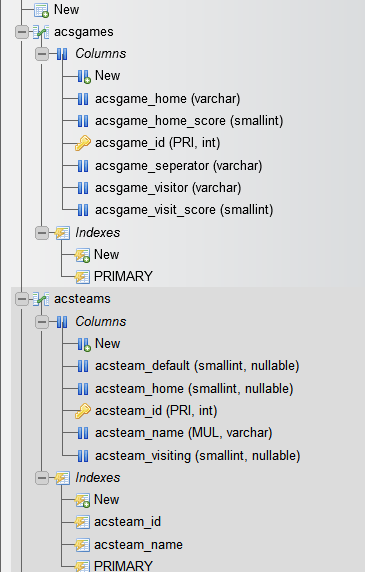
If we look at our database with phpMyAdmin, we can see the tables have been created.